Introduction
Items are often purchased, stored, and sold using different units of measure. For example, a company may maintain inventory in Pcs (Pieces) but purchase or sell the same item in Boxes.
To handle these scenarios, the Item Unit of Measure functionality allows you to define a Base Unit of Measure and one or more Alternate Units of Measure with appropriate conversion factors.
What is an Item Unit of Measure?
An Item Unit of Measure (UOM) defines the quantity in which an item is purchased, stored, consumed, transferred, or sold.
For example, consider an item called IoT Sensor.
The company may maintain inventory using:
- Base Unit of Measure: Pcs
- Alternate Unit of Measure: Box
- Conversion: 1 Box = 20 Pcs
In this example, Pcs is the inventory tracking unit, while Box is an alternate unit used for purchasing or selling.
The system automatically converts the quantity entered in the alternate UOM into the Base Unit of Measure.
Understanding Base Unit of Measure
The Base Unit of Measure is the primary unit used for maintaining the item’s inventory quantity.
When setting up an item, you should carefully select the Base Unit of Measure because all alternate units are ultimately converted into this unit.
Example: Consider the Item IoT Sensor have Base Unit of Measure is PCS.
If the inventory quantity is 500 Pcs, the system considers the available inventory as 500 Pcs.
Even if users purchase or sell the item using Boxes, the quantity is converted back to Pcs for inventory management.
Choosing the Base Unit of Measure
As a best practice, select the Base Unit of Measure based on the smallest practical unit in which the item needs to be tracked.
For example:
| Item | Recommended Base UOM |
| USB Cable | Nos |
| IoT Sensor | Pcs |
| Paper | Kgs |
| Liquid Chemical | Ltr |
| Fabric | Mtr |
The Base Unit of Measure should be selected according to the actual inventory tracking requirements of the organization.
Configuring Multiple Units of Measure
Step 1: Define the Base Unit of Measure
Navigate to: Items → Item Card → Base Unit of Measure
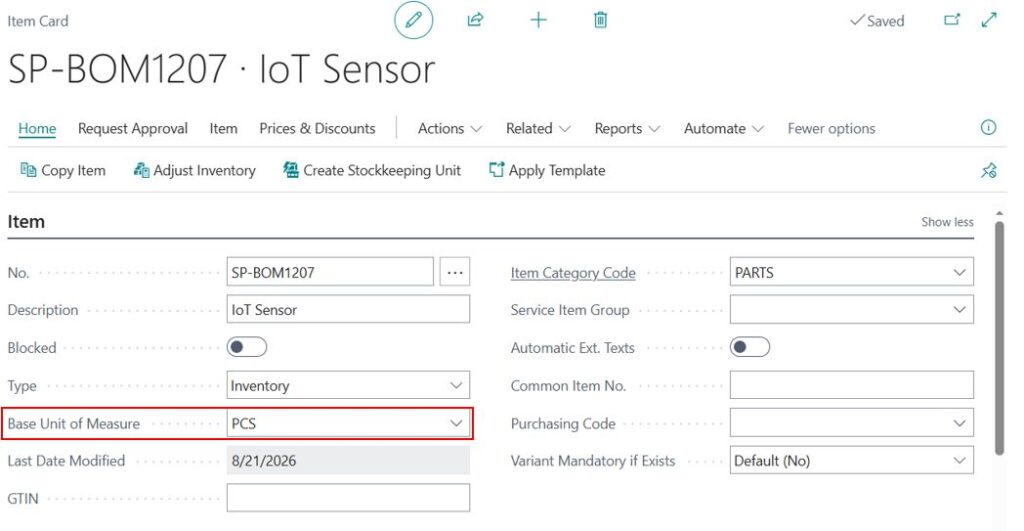
Set the primary tracking unit.
Example
Item: IoT Sensor
Base Unit of Measure: PCS
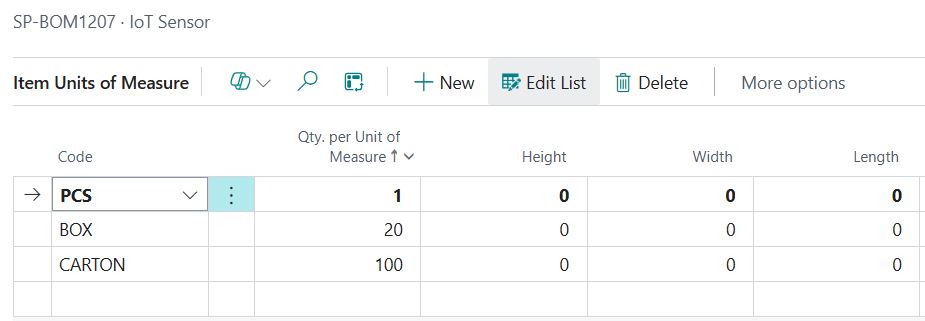
Step 2: Define Additional Units
Navigate to: Item Card → Related → Units of Measure
Create additional UOMs with conversion quantities.
Example:
| Code | Qty. per Unit |
|---|---|
| PCS | 1 |
| BOX | 20 |
| CARTON | 100 |
This means:
- 1 BOX = 20 PCS
- 1 CARTON = 100 PCS
Recommended approach
When deciding the Base Unit of Measure, ask:
- What is the smallest practical unit in which inventory needs to be tracked?
- Do warehouse users need to track individual pieces?
- Can the item be purchased in larger packaging?
- Can customers purchase the item in different packaging?
- Are stock quantities required at the individual-unit level?
Based on these requirements, select the appropriate Base Unit of Measure and then define the required Alternate UOMs.
Conclusion
Understanding Item Units of Measure makes it easier to manage items that are purchased, stored, and sold in different units.
By correctly setting up the Base Unit of Measure, Alternative Unit of Measure, and conversion quantity, you can:
- Maintain accurate inventory quantities
- Purchase items in the required packaging
- Sell items in different units
- Reduce manual quantity calculations
- Avoid inventory discrepancies caused by incorrect conversions
- Make Purchase and Sales transactions easier for users
For example, with:
Base UOM = Pcs
Alternative UOM = Box
1 Box = 10 Pcs
Users can purchase or sell in Boxes, while inventory can be accurately tracked in Pcs.
We hope this article helps you understand Item Units of Measure and gives you a practical approach to setting up and using Base and Alternative UOMs in your daily Purchase, Sales, and inventory processes.